



 Value Shelving
  Chrome Shelving
 Warehouse Shelving
 Industrial Shelving
 Garage Shelving
 Metal Shelving
  Plastic Shelving
 HORECA
 Galvanised Shelving
 Industrial Workbench
  Value Workbench
  Modular Workstations
 Matting
  Metal Lockers & Benches
 Office
  Slatwall
  Cabinets
 Plastic Lockers
 Lean Products
 Mobile Steps
 Wall-Zone
 Longspan Racking
  Cantilever Racking
  Industrial Pallet Racking
 Wire Mesh Decking
 Tyre Racking
 Vertical Storage
 Racking Accessories
 Up & Over Gates
 Containers & Boxes
  Louvre Panels
 Crystal Box Systems
 Parts Bins
  Euro Containers
 Visible Storage Boxes
  Foldable Crates

 Shelf Bin
 Tool Organiser

 Waste Management
 Cabinets
 Chemical & CoSHH Cabinets
  Hex Lighting
 Packaging
 Platform Trolleys
  Hand Trucks
  Pallet Trucks
  Plastic Pallets

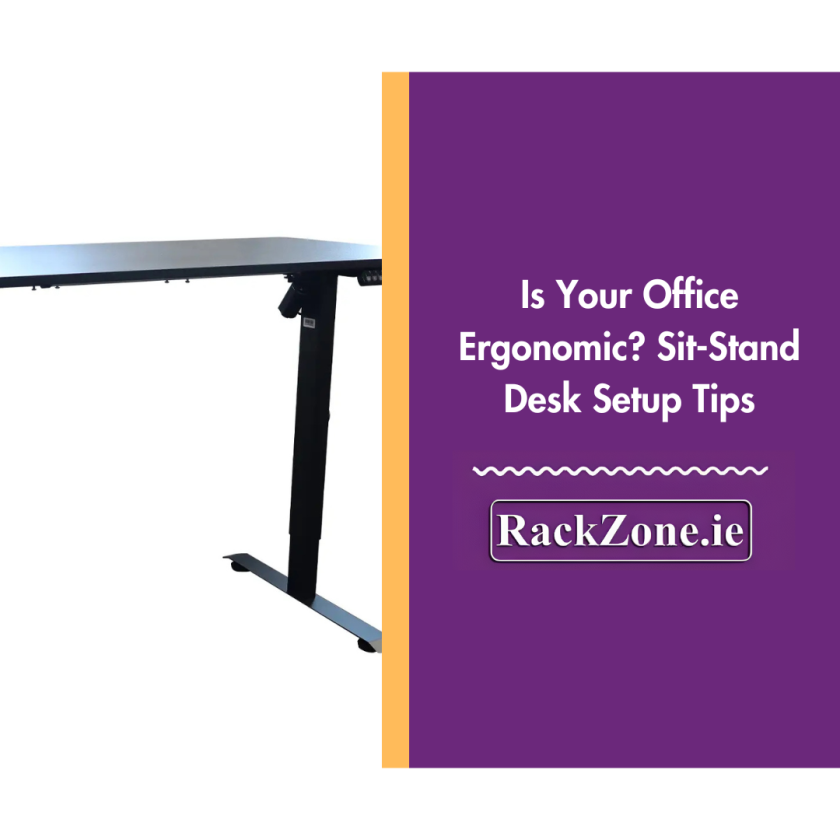
Is Your Office Ergonomic? Sit-Stand Desk Setup Tips
Estimated reading time: 6 minutes
What Will You Learn from This Guide?
- How to set up your desk ergonomically for both sitting and standing positions.
- Practical ways to reduce strain on your neck, back and wrists throughout the workday.
- What Irish workplace regulations say about ergonomic setups.
- Expert recommendations for choosing and adjusting height-adjustable desks.
- Simple checks to assess whether your current workspace is working for you.
Why Does Ergonomics Matter in Today's Workspace?
For anyone spending hours at a desk, proper ergonomics isn't just about comfort. It's about preventing long-term musculoskeletal problems, maintaining focus and staying productive throughout the day.
Irish employers have clear legal responsibilities here. According to the Safety, Health and Welfare at Work (General Application) Regulations 2007, employers in Ireland are legally required to ensure the safety and well-being of their employees, including evaluating the ergonomics of their workstations. These obligations extend beyond traditional offices to remote and hybrid workers, so businesses need to consider ergonomic support regardless of where their teams are based.
Height adjustable desks have become common equipment in modern workplaces because they allow people to switch between sitting and standing throughout the day. This flexibility helps combat the negative effects of prolonged sitting and gives you control over your posture and comfort. Whether you're setting up a compact home office with a Single Motor Height Adjustable Desk with Integrated Desk Package or outfitting a larger workspace with an Electric L Shaped Corner Standing Desk with Height Adjustable Ergonomics, the ergonomic principles remain the same.
How Do You Find the Right Height for Your Desk, Chair and Monitor?
Getting your desk and monitor height right makes a difference to how your body feels at the end of the day. Ergonomic guidelines recommend that your desk should be at the height of your elbows when seated or standing. Your monitor should be positioned in front of you so that your head faces forward, with your eyes level with the top of the monitor or slightly below.
When you're sitting, adjust your chair so your feet rest flat on the floor with your thighs roughly parallel to the ground. Your desk should then sit at a height where your elbows form approximately a 90-degree angle when your hands are on the keyboard. Your wrists should remain straight rather than bent upwards or downwards. This neutral position prevents strain on the tendons and nerves running through your wrists.
For standing positions, the same elbow rule applies. Raise your desk until your arms can rest comfortably at keyboard height without hunching your shoulders or bending your wrists. Position your monitor about an arm's length away, with the top of the screen at or slightly below eye level. This prevents you from tilting your head upwards or downwards, which puts strain on your neck muscles.
Taking breaks remains important whether you're sitting or standing. Even the most perfectly adjusted desk won't prevent fatigue if you remain static for hours. Aim to change position every 30 to 45 minutes and build in opportunities to walk around, stretch or simply shift your weight.
Pro Tip: If you're using a dual-monitor setup, keep both screens at equal height and distance from your eyes. Position them so you don't need to rotate your head excessively to view either screen comfortably.
What Are the Expert Recommended Sit Stand Desk Setup Tips?
Maintain a neutral body position while both sitting or standing. Your hands, wrists and forearms should be straight and relatively parallel to the floor.
Neutral posture means your body is aligned naturally, without twisting, leaning or reaching. When standing, distribute your weight evenly across both feet, positioned roughly shoulder-width apart. Avoid locking your knees, as this restricts blood flow and can cause discomfort. Keep your shoulders relaxed rather than hunched up towards your ears and engage your core muscles gently to support your lower back.
Transitioning between sitting and standing takes practice. Start conservatively: perhaps 15 to 20 minutes of standing for every hour of sitting. Then gradually increase as your body adapts. Some people find it helpful to stand during specific activities like phone calls or certain types of reading, which creates natural transition points throughout the day.
Setup points for ergonomics:
- Adjust your desk so your arms remain parallel to the floor when typing
- Position your monitor slightly below eye level to maintain a neutral neck angle
- Use an anti-fatigue mat when standing to reduce pressure on your feet and legs
- Keep your keyboard and mouse close together to minimise reaching
- Store items you use constantly within easy arm's reach to avoid repetitive stretching
Your workspace layout matters too. Position items you use constantly (phone, notepad, files you access regularly) within what's called the primary work zone: the semicircle you can reach without leaning forward. Less frequent items can sit in the secondary zone, requiring a slight reach but not a full lean.
How Do You Choose the Right Sit Stand Desk for Your Needs?
Not all height-adjustable desks perform equally, so understanding what to look for helps you make a sound investment.
For compact home offices or smaller workspaces, the Single Motor Height Adjustable Desk with Integrated Desk offers smooth height control with everything you need in one package. The single motor provides reliable adjustment and keeps the setup straightforward.
For larger spaces or corner configurations, the Electric L-Shaped Corner Standing Desk with Height Adjustable Ergonomics delivers dual motor stability and more surface area. The L-shaped design works well for anyone managing multiple projects at once or requiring separate zones for different types of work.
When evaluating any sit stand desk, consider these key factors:
Adjustment range: The desk needs to accommodate your height comfortably in both sitting and standing positions. Taller users require desks that extend higher, and shorter users need desks that lower sufficiently when sitting. Research indicates that the best sit-stand desk needs to have a large height range to suit users of different heights.
Stability: A desk that wobbles when raised to standing height becomes frustrating quickly. Dual motor systems generally provide better stability at maximum height, though quality single motor desks also perform well for most users.
Motor noise: You'll be adjusting your desk multiple times daily, so a quiet motor matters. Look for desks with quiet operation that won't disrupt phone calls or concentration.
Weight capacity: Consider not just your current setup but potential additions. If you might add a second monitor or heavier equipment later, choose a desk rated for higher loads.
Accessories enhance ergonomic performance. Monitor arms are excellent options for freeing up desk space and allowing precise positioning of your screen. Document holders ensure the user remains upright by positioning reference materials at eye level. Cable management trays keep wires organised and prevent trip hazards, and footrests provide additional support when sitting.
What Do Irish Workplace Regulations Say About Ergonomics?
Irish employers must comply with safety and welfare legislation that includes ergonomic considerations. The Safety, Health and Welfare at Work (General Application) Regulations 2007 require employers to evaluate health and safety at workstations with particular reference to eyesight, physical difficulties and mental stress. Providing height adjustable desks represents one practical way to meet these obligations, particularly for employees experiencing discomfort or musculoskeletal issues related to their workstation.
Employers should provide training on how to set up workstations properly. Simply purchasing ergonomic equipment isn't enough. Staff need guidance on adjusting their desks correctly and understanding why proper setup matters. This training might include demonstrations of correct postures, explanations of adjustment mechanisms and individual assessments to identify specific needs.
Beyond legal compliance, investing in ergonomic setups can deliver business benefits. Employees working in comfort may experience less fatigue and maintain focus more effectively. For businesses competing for talent, demonstrating concern for employee wellbeing through quality workspace equipment can strengthen retention and attract candidates who value health-conscious employers.
Remote and hybrid workers deserve the same consideration. Employers might consider providing ergonomic equipment for home offices or offering stipends for employees to purchase approved items. Regular check-ins about workspace setup, perhaps including photos or video calls showing the home workspace, help ensure remote staff aren't developing problems that could have been prevented.
Is Your Office Setup Ergonomic? Use This Quick Checklist
Run through these checks to assess your current workspace:
- Your desk sits at elbow height when you're seated or standing
- The top of your monitor aligns with your eye level when you're looking straight ahead
- Your wrists remain straight and level when typing, not bent upwards or downwards
- Your shoulders stay relaxed, not hunched towards your ears
- Your chair provides adequate lumbar support for your lower back
- You're changing position regularly rather than remaining static
- You have sufficient space under your desk to move your legs freely
- Items you use constantly sit within easy reach without requiring leaning or stretching
- Your feet rest flat on the floor when sitting, or on a footrest if needed
- Lighting in your workspace prevents screen glare without causing eye strain
If several of these points don't match your current setup, you'll likely benefit from adjustments or potentially new equipment. Small changes can improve how you feel throughout the workday.
Ready to Create a Healthier Workspace?
Small adjustments to your workspace setup can help prevent health problems down the line and improve how you feel during and after work. Whether you're experiencing discomfort with your current arrangement or simply want to optimise your setup, taking time to assess and improve your ergonomics represents a worthwhile investment in your wellbeing.
Browse our range of adjustable desks to find the right solution for your workspace. The Single Motor Height Adjustable Desk with Integrated Desk Package provides everything needed for a compact setup, and the Electric L Shaped Corner Standing Desk with Height Adjustable Ergonomics offers expanded workspace for more complex requirements. Both options deliver the flexibility and quality needed to create an ergonomic office environment that supports your health and productivity.
For advice on selecting the right desk for your specific needs, contact our team. We're here to help you build a workspace that works for you.
Frequently Asked Questions (FAQs)
How often should I switch between sitting and standing?
What's the ideal height for a standing desk?
Do I need a special chair with a sit stand desk?
How can I make my existing desk more ergonomic?

Ciaran Duffy
Director
Ciaran is a seasoned storage solutions expert and Director at RackZone, with over 10 years of experience providing high quality shelving, pallet racking, and storage systems to private and commercial clients across Ireland and the UK. His deep understanding of warehouse logistics and space optimisation makes him a trusted voice in the industry. Whether advising on large-scale industrial fit-outs or smart storage for small businesses, Ciaran is passionate about helping clients find efficient, durable, and cost-effective solutions. His expertise lies in warehouse planning, racking systems, and end to end storage project management.